
Decision Snapshot
Best for: Teams where two or more APIs pass data in sequence and outputs keep arriving empty or malformed
Avoid if: You are still changing your workflow architecture weekly — normalization logic breaks on schema changes
Reality: The fix is a single transformer node, but finding the cause takes longer than building it
Verdict: Add normalization before the first handoff — not after the fourth failed run
The Wrong Diagnosis Costs More Than the Problem
The first assumption is almost always the same: the API endpoint changed. Something broke upstream. A key rotated. A webhook stopped firing.
None of those were the issue.
Step 1 was outputting XML. Step 2 was expecting JSON. The handoff failed silently on every run because the receiving node could not parse the incoming structure — and reported nothing useful about why.
That is the pattern. When data transfer breaks between steps, the instinct is to look at the connection. The actual problem is usually the shape of the data itself.
The diagnosis matters because it determines where you spend the next hour. Checking API credentials, refreshing tokens, and inspecting webhook logs are all reasonable — and all irrelevant when the root cause is a structural mismatch sitting one layer upstream from where the error appears.
Before you touch any credentials, open the failed run, select the failed action, and read the raw input values. In Power Automate, that means clicking the failed node and expanding the “Inputs” section. In n8n, it means checking the item output from the previous node. The format will tell you immediately whether you are looking at XML, unescaped strings, a nested object where a flat key was expected, or a date string in the wrong locale.
What the Failure Actually Looks Like
The symptom is not dramatic. The downstream step either returns empty, throws a parse error, or — worst case — silently passes a null value into the next node without stopping the flow.
In practical terms, that means:
- A CRM field that should populate stays blank after every run
- An AI summarization step receives an unparseable input and returns a generic failure with no field-level detail
- A document extraction workflow completes every node but the output spreadsheet contains no data
The third scenario is the most dangerous. The flow reports success. The data is missing. Someone notices three days later.
When a node receives a format it cannot parse, it does not always halt. It often continues with whatever it could extract — which is sometimes nothing, sometimes a stringified object, sometimes a partial field that looks valid until you compare it against what should have arrived.
Verification step: After any multi-API handoff, add a logging node immediately after the transfer point. Log the raw output to a test sheet or console before the next processing step fires. If the logged value looks like <root><field>value</field></root> where your next node expects {"field": "value"}, the mismatch is confirmed.
The Fix: Normalization Before the First Handoff
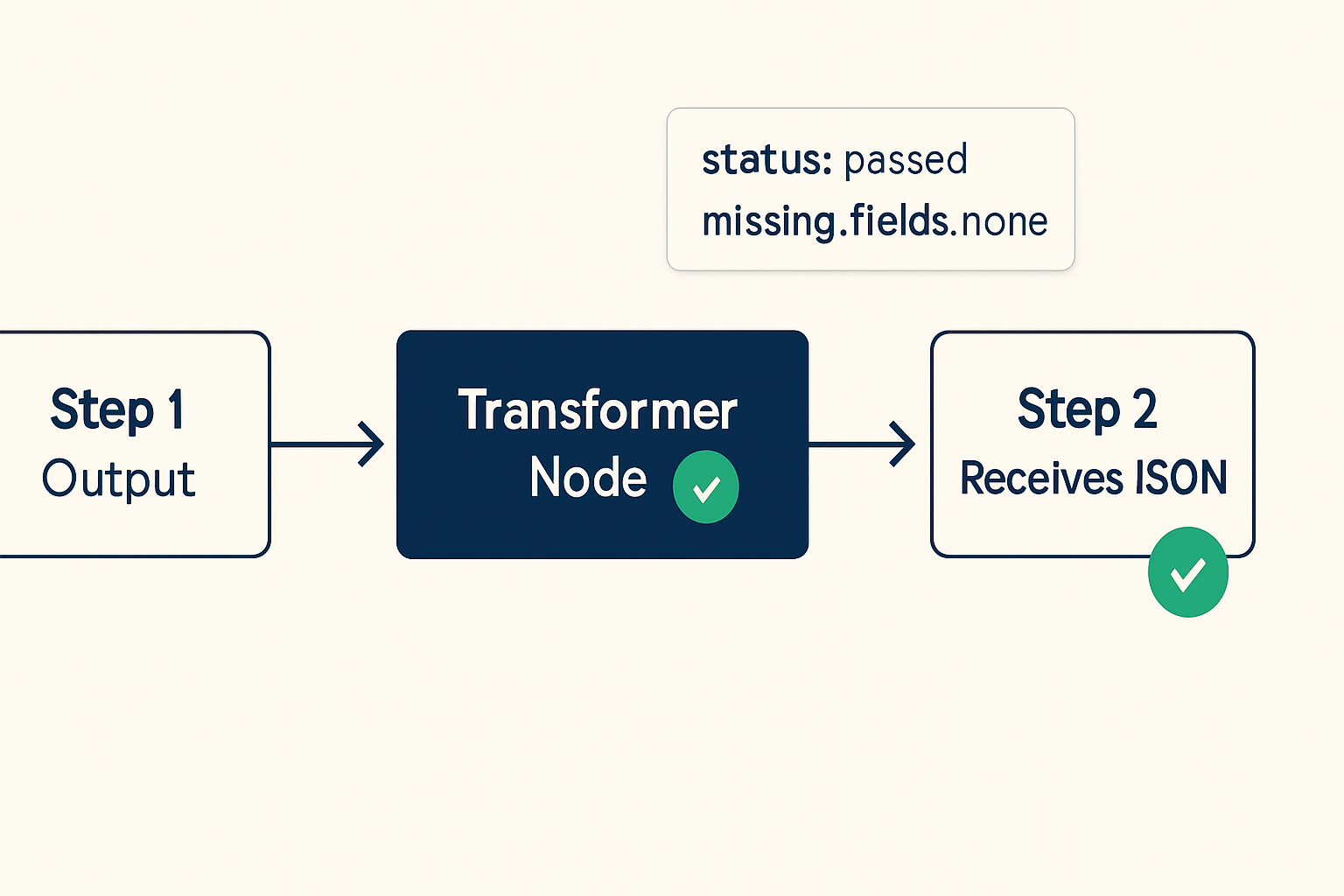
The correct fix is not a prompt adjustment. It is not a retry loop. It is a dedicated transformation step inserted between Step 1 and Step 2 — before the first handoff, not after something breaks.
The transformer node has one job: convert whatever format Step 1 produces into the format every downstream node expects. In most visual workflow tools, this is a built-in node type. In n8n, it is the Function or Code node. In Make (formerly Integromat), it is a Tools → Set Variable or JSON Parse module. In Power Automate, it is a Parse JSON action with a defined schema.
Exact Fix Sequence
- Open the failed run and inspect the raw output of the last successful node
- Identify the format: XML, flat string, nested object, mismatched date format, or array where a single object was expected
- Insert a transformer node between the two steps
- Map the incoming structure to the expected output schema explicitly — do not rely on auto-mapping
- Add a logging node after the transformer to confirm the normalized output before it reaches Step 2
- Run the flow once in test mode and verify the receiving node gets the correct structure
In n8n, a basic normalization node for converting a flat XML-style string to JSON looks like this:
// n8n Code node — normalize XML-style output to JSON
const rawInput = items[0].json.rawOutput;
const parsed = {};

parsed.customer_id = rawInput.match(/<customer_id>(.*?)<\/customer_id>/)?.[1] || null;
parsed.order_status = rawInput.match(/<order_status>(.*?)<\/order_status>/)?.[1] || null;
parsed.timestamp = rawInput.match(/<timestamp>(.*?)<\/timestamp>/)?.[1] || null;

return [{ json: parsed }];
Replace the field names with whatever your Step 1 actually outputs. The principle is the same regardless of tool: extract the values explicitly, rebuild the object in the shape Step 2 expects, return it clean.
The real ROI here is not that the workflow runs faster — it is that the same silent failure no longer needs to be corrected by hand every week. That is The Profit Angle no one tracks: the invisible correction loop that someone quietly absorbs into their day because the automation “almost works.”
Before / After: The Same Flow, Two Different States
Practical scenario: An intake form feeds a lead qualification agent (Step 1), which outputs a structured response. That response routes to a CRM update node (Step 2). The qualification agent returns a nested XML-style string. The CRM node expects a flat JSON object. Every run completes. Every CRM record stays blank. The fix: a normalization node between Step 1 and Step 2 that extracts the nested fields and rebuilds the object as {"lead_score": 7, "segment": "enterprise", "qualified": true}. Typical correction time before the fix: roughly 25 minutes per batch. After: none.
The Part Everyone Skips: Schema Drift
The transformer node fixes the immediate mismatch. It does not protect you from future ones.
API responses change. A field gets renamed. A date format shifts from YYYY-MM-DD to a Unix timestamp. A nested array becomes a flat string in a newer API version. The transformer you built last month expects the old shape.
This is schema drift. It is the second failure that hits after the first fix.
The pattern that catches it early: add a schema validation step after your transformer, not just a logging node. In n8n, a simple validation check looks like this:
// Validation gate — route to review if required fields are null
const required = ['customer_id', 'order_status', 'timestamp'];
const item = items[0].json;
const missing = required.filter(field => item[field] === null || item[field] === undefined);

if (missing.length > 0) {
  // Route to error handler or Slack alert
  return [{ json: { status: 'failed', missing_fields: missing, raw: item } }];
}

return [{ json: { status: 'passed', data: item } }];
When missing_fields is non-empty, the flow routes to a review queue instead of writing to the CRM. The failure is visible immediately, not three days later.
Navigation path in n8n: Workflow canvas → Add node → Search “Code” → paste validation logic → connect output to a conditional branch: status === 'passed' routes forward, status === 'failed' routes to error handling node.
What This Does Not Solve
A normalization node handles structural format problems. It does not handle everything that can break a multi-API chain.
- Semantic mismatches: If Step 1 returns a valid JSON object but the field values are in the wrong unit, wrong language, or wrong scale, the transformer will pass them through cleanly. The data will still be wrong.
- Vector dimension mismatches: If your workflow involves embedding models and a vector database, a format mismatch is a different problem entirely — the embedding dimensions must match what the database index was built with. A JSON transformer does not fix a 1536-dimension output going into a 768-dimension index.
- Rate-limited or paginated responses: If Step 1 returns a partial response because the API paginated, the transformer will normalize whatever arrived — not the complete dataset. The missing records will look like absent fields, not like a pagination issue.
- Unstable schemas mid-workflow: If you are still changing your workflow architecture regularly, adding a rigid normalization layer will create more breakage, not less. Normalization is a stability layer, not a development tool.
The method works best on stable, repeating workflows where the input format from Step 1 is predictable. As soon as Step 1 can return one of several possible structures depending on logic, the transformer needs branching logic — and that is a different build.
The Checklist Before You Ship Any Multi-API Chain
- Inspect the raw output of every API node before connecting it to the next step
- Confirm the expected input format of every receiving node — do not assume JSON is universal
- Insert a transformer node at every handoff point where formats differ
- Add a logging or validation node immediately after the transformer in test mode
- Define required fields explicitly and route null results to a review state, not forward
- Document the expected schema for each step — when the API changes, you will know exactly where to update
- Run the complete chain in test mode with a real payload before activating
If any step in this list reveals a format you did not expect, that is the break. Fix it there, not at the error message.
Get the workflow breakdown
The normalization node template and validation gate snippet are available in the setup notes. Join the list and get the exact config for n8n, Make, and Power Automate — no generic newsletter, just the working files.