
AI Video Generator That Animates Images
Introduction to AI Image Animation: Bringing Still Photos to Life
AI video generators that animate images represent a revolutionary technology that transforms static visuals into dynamic motion. These sophisticated tools leverage artificial intelligence to analyze still images and intelligently add movement, creating short video clips that breathe life into previously static content.
The evolution of image-to-video AI technology has accelerated dramatically in recent years. What began as experimental research has now matured into accessible platforms that offer increasingly realistic and customizable animations. This technological progression has democratized animation capabilities that were once exclusive to specialized professionals with extensive training.
Animating images has become crucial for modern content creation as audiences increasingly favor dynamic content over static visuals. In today’s fast-scrolling digital landscape, motion captures attention more effectively, making these tools invaluable for content creators, marketers, educators, and businesses seeking to maximize engagement across digital channels.
My Take: The emergence of AI image animation tools represents a significant shift in content creation accessibility. Market consensus indicates these technologies are rapidly maturing, with each iteration bringing improvements in motion quality and user control. These tools are democratizing animation capabilities that previously required specialized skills, positioning them as essential assets in the modern digital creator’s toolkit.
How AI Transforms Static Images into Dynamic Videos
The underlying AI technologies powering image animation rely primarily on deep learning and generative models. These systems are trained on vast datasets of videos to understand natural motion patterns and apply them convincingly to static images. Advanced neural networks analyze the content of images to determine which elements should move and how that movement should appear natural.
The key steps in the image-to-video animation process typically include:
- Image analysis to identify distinct elements and their relationships
- Motion prediction based on the identified elements
- Generation of intermediate frames to create smooth movement
- Rendering the final video with consistent visual quality
Understanding motion control and style application is essential for creating effective animations. Most platforms offer text-based prompting systems where users can specify the type, direction, and intensity of movement they want applied. This allows for creative control over how elements like water, clouds, characters, or other objects move within the frame.
My Take: The technological sophistication behind these animation tools is remarkable, yet they present this complexity through increasingly intuitive interfaces. Users typically report that while the underlying AI is advanced, the learning curve for basic usage is surprisingly manageable. The balance between accessibility and powerful capabilities is what makes these tools particularly valuable for both casual creators and professionals seeking efficiency gains.
Core Features and Capabilities of Leading AI Image Animators
A primary capability of AI video generators is applying motion to specific elements within an image. Whether making a character’s hair blow in the wind, animating water ripples, or creating subtle movements in foliage, these tools can target particular aspects of an image while leaving others static. This selective animation creates more natural and controlled results.
Text-to-motion prompts have become a standard feature, allowing users to describe the desired animation in natural language. For example, a user might type “gentle breeze blowing through trees from left to right” to achieve that specific motion effect. This approach provides intuitive creative control without requiring technical animation knowledge.
Most platforms support common output formats like MP4, GIF, and WebM, with resolutions typically ranging from 720p to 4K depending on the service tier. Integration options vary, with some tools offering standalone web applications while others provide APIs for incorporation into larger workflows or custom applications.
Additional advanced features available on select platforms include:
- Character animation with facial expressions and body movements
- Camera motion effects like panning, zooming, and rotation
- Style transfer to apply artistic effects throughout the animation
- Audio synchronization for matching movement to sound
My Take: The feature sets across these platforms show a clear focus on balancing automation with user control. Market reputation suggests that while all tools can generate basic animations, the distinction between platforms often comes down to the finesse of motion control and output quality. Users typically gravitate toward tools that align with their specific content needs rather than those with the most features, as specialized capabilities often matter more than feature quantity.
Top Use Cases: Who Benefits from Animating Images with AI?
Enhancing social media content and digital marketing campaigns represents one of the most common applications for AI image animation. Marketers use these tools to transform product photos into attention-grabbing animations, significantly increasing engagement rates compared to static imagery. The ability to quickly produce dynamic content helps brands maintain an active and engaging social media presence.
In educational contexts, these tools help create engaging presentations and instructional materials. Educators can animate diagrams, charts, and illustrations to better explain complex concepts, making learning more interactive and memorable for students. The visual dynamism helps maintain attention and improve information retention.
Artists and visual storytellers use AI animation for prototyping concepts and developing narratives. The technology allows for rapid visualization of ideas without the time investment of traditional animation, enabling more efficient creative exploration and iteration. This accelerated workflow helps creators test multiple approaches before committing to full production.
Small businesses particularly benefit from these tools by gaining access to professional-quality video content without specialized skills or expensive resources. The ability to transform existing brand assets into animations provides a cost-effective way to compete visually with larger companies that have dedicated production teams.
My Take: The diverse application scenarios for AI image animation reflect its versatility as a creative tool. Market feedback indicates that social media content creators see some of the highest ROI from these tools, with engagement metrics often showing significant improvements when static content is replaced with animated versions. The accessibility factor is particularly valuable for small teams and individual creators who lack dedicated animation resources but need to maintain competitive visual quality.
Choosing the Best AI Video Generator for Your Needs
When selecting an AI animation tool, several factors should guide your decision. Ease of use is paramount for those without technical backgrounds, while output quality becomes the priority for professional applications. Control granularity matters for specific creative visions, and output length capabilities vary significantly between platforms, from brief clips to longer sequences.
Leading platforms in this space each offer distinct advantages:
- Adobe Firefly leverages Adobe’s design ecosystem integration and emphasizes high-quality, consistent outputs
- Leonardo.Ai focuses on creative flexibility and artistic applications with strong style control
- RunwayML offers advanced motion capabilities and professional-grade outputs with robust editing features
- Pika Labs provides accessible animation with straightforward interfaces and quick results
- HeyGen specializes in character animation and realistic human movement
When evaluating different tools, practical considerations should include testing the free tier capabilities before committing to paid plans, examining the specific animation styles each platform excels at, and considering workflow integration with your existing creative tools.
My Take: The selection landscape for these tools continues to evolve rapidly as capabilities expand. Users typically report that platform specialization often matters more than general capabilities—RunwayML tends to appeal to more technical users seeking precision, while Pika Labs and Leonardo.Ai have gained traction with creative professionals looking for expressive results. Adobe Firefly’s integration with Creative Cloud represents a significant advantage for those already within that ecosystem.
Limitations and Considerations When Using AI for Image Animation
Despite impressive capabilities, AI animation tools face challenges in achieving precise control over complex movements. Users may find that very specific motion sequences or intricate interactions between multiple elements can be difficult to achieve consistently. The technology excels at general motion patterns but may struggle with highly customized animation requirements.
The “uncanny valley” effect—where animations appear almost realistic but contain subtle abnormalities that create viewer discomfort—remains a challenge, particularly with human figures. Quality variations can also occur depending on the input image clarity, composition, and content complexity.
Processing times and resource requirements vary significantly between platforms. Higher-quality animations typically require more processing time, with some platforms taking minutes or even hours to generate complex animations at high resolutions. This can impact workflow efficiency for time-sensitive projects.
Ethical considerations include being transparent about AI-generated content, respecting copyright when animating others’ images, and being mindful of potential misuse for creating misleading media. Responsible use practices are increasingly important as these technologies become more widespread and realistic.
My Take: The limitations of current AI animation technology highlight that these tools are best viewed as accelerators rather than replacements for traditional animation expertise. Market feedback suggests that managing expectations around what these tools can realistically achieve is crucial for user satisfaction. The technology continues to advance rapidly, but understanding its boundaries helps users leverage its strengths while working around its current constraints.
The Future of AI Image-to-Video Technology
Advancements in realism and longer video generation represent the most anticipated developments in this field. Research indicates that future iterations will likely overcome current duration limitations, enabling the creation of extended sequences with consistent quality and coherent narrative flow.
Increased integration with broader creative workflows is becoming evident as these tools evolve from standalone applications to components within comprehensive content creation ecosystems. This integration trend promises more seamless transitions between different creative processes and tools.
The democratizing effect of AI on video production continues to expand, making sophisticated visual storytelling accessible to creators regardless of technical background or budget constraints. This accessibility is reshaping expectations around video content quality across digital platforms.
My Take: The trajectory of AI image animation technology points toward increasingly sophisticated results with simplified user experiences. Industry analysts predict that the distinction between AI-generated and traditionally produced animations will continue to narrow, particularly for short-form content. These tools are positioned to become standard components in creative workflows rather than novelty applications, fundamentally changing how visual content is produced across industries.
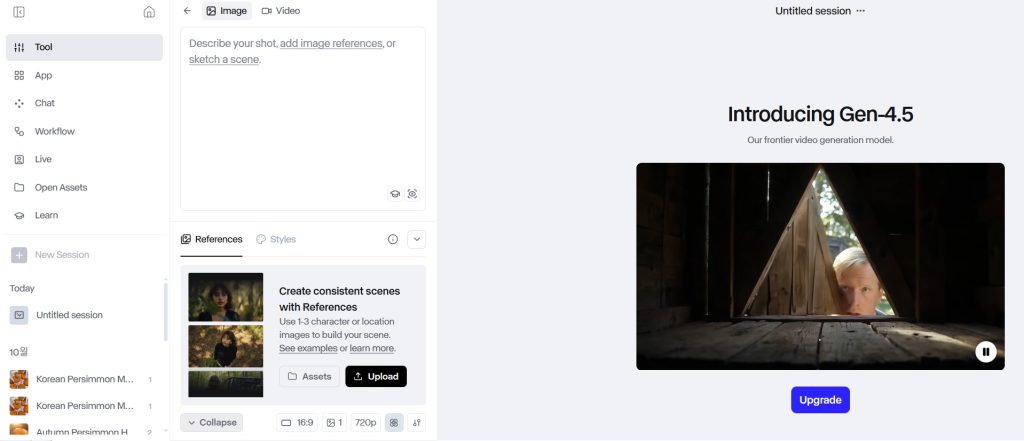
How I’d Use It: The “Prompt Director” Workflow
Since the latest AI models like Runway Gen-3 Alpha & Gen-4.5 have phased out manual brushes, I shifted my strategy to “Text-Based Directing.”
Here is my new workflow:
-
The Setup: I upload my static product photo into Runway’s new interface.
-
The Magic Command: Instead of painting manually, I type a specific prompt like: “Slow motion cinematic zoom out, water flowing continuously.”
-
The Result: The AI understands the physics better than I do, creating a perfectly looped video without me touching a single pixel.
Bottom line: This turns me from a “video editor” into a “video director,” producing high-end commercial clips just by typing one sentence.
Conclusion: Revolutionizing Visual Content with AI-Animated Images
AI video generators that animate images have transformed the landscape of visual content creation, offering unprecedented accessibility to motion design capabilities. These tools empower creators to produce engaging dynamic content without specialized animation training, significantly lowering the barriers to entry for video production.
As the technology continues to mature, we can expect even more intuitive interfaces, higher quality outputs, and deeper integration with existing creative workflows. The democratization of animation capabilities represents a fundamental shift in how visual stories are told across digital platforms.
Pricing Plans
Below is the current pricing overview for the tools mentioned above:
- Adobe Firefly: $9.99/mo, Free Plan Available
- Leonardo.Ai: $12/mo, Free Plan Available
- RunwayML: $12/mo, Free Plan Available
- Pika Labs: $8/mo, Free Plan Available
- HeyGen: $15/mo, Free Plan Available
Value for Money
When evaluating value proposition, Pika Labs stands out for offering the lowest entry point to premium features while maintaining competitive output quality. This makes it particularly attractive for individual creators and small businesses looking to experiment with AI animation without significant investment. The platform’s straightforward approach delivers solid results for social media content and basic animation needs.
Adobe Firefly presents compelling value for existing Adobe Creative Cloud subscribers, as its integration with other Adobe tools creates workflow efficiencies that extend beyond raw feature comparisons. Meanwhile, RunwayML and Leonardo.Ai occupy a middle ground with similar pricing but different specializations—RunwayML excels in professional video applications with more precise controls, while Leonardo.Ai offers stronger creative styling options. HeyGen commands a premium but delivers specialized capabilities for character animation that justify the higher price point for specific use cases.
The availability of free tiers across all platforms provides an excellent opportunity for users to test capabilities before committing financially. These free options typically offer limited resolution, shorter output durations, or watermarked content but provide sufficient functionality to evaluate whether a tool meets specific creative needs.

Editor’s Summary
AI video generators that animate images enable creators to turn still photos into motion-rich clips without traditional animation skills. This article explains how the technology works, compares core features and pricing across major platforms, and highlights use cases from social media marketing to education and prototyping. It also outlines current limitations, ethical considerations, and future trends so readers can choose and deploy the right AI video generator that animates images for their workflows.