
AI Tools for Image Editing
What Are AI Image Editing Tools?
AI image editing tools represent a revolutionary shift in visual content creation, leveraging artificial intelligence to automate and enhance traditional editing workflows. These sophisticated applications use machine learning algorithms to understand image content, making intelligent decisions about edits rather than requiring manual pixel manipulation.
AI significantly enhances traditional editing workflows by automating repetitive tasks, suggesting improvements, and enabling complex edits with simple commands. This technology can analyze images to identify elements like faces, objects, and backgrounds, then apply appropriate adjustments based on that understanding.
The key benefits include dramatic efficiency improvements, with AI tools reducing the time spent on repetitive tasks such as cropping, resizing, and removing blemishes. They also unlock new creative possibilities by making advanced techniques accessible to users of all skill levels, democratizing professional-quality editing capabilities.
My Take: The integration of AI into image editing represents one of the most significant paradigm shifts in creative technology of the past decade. These tools are transforming workflows across industries by reducing technical barriers while simultaneously expanding creative possibilities. Market consensus indicates that even professional designers are embracing these AI assistants for routine tasks, allowing more time for higher-value creative work.
Core Features and Capabilities of AI Image Editors
Modern AI image editors offer an impressive array of capabilities that were once the domain of skilled professionals spending hours on manual edits:
- Generative fill and object removal: AI tools can perform complex tasks like object removal with simple prompts or clicks. Many platforms offer AI-driven content-aware fill functions that intelligently fill selected areas. Generative fill features allow users to expand images beyond their original borders or add new elements based on text descriptions.
- AI-powered background manipulation: Tools can automatically detect and isolate subjects, enabling one-click background removal, blurring, or replacement with new scenes.
- Image enhancement: Many AI image editors offer automatic image enhancement, including upscaling resolution, sharpening details, and reducing noise, breathing new life into low-quality images.
- Style transfer and artistic filters: AI can analyze and apply the distinctive style of famous artworks or custom aesthetics to any image.
- Automated color correction and grading: AI tools can automatically correct colors, adjust exposure, and apply artistic filters to photos, ensuring consistent visual quality.
My Take: The most transformative aspect of AI image editing is how it collapses complex, multi-step processes into simple, intuitive commands. What’s particularly noteworthy is how these tools continue to improve with each iteration, with recent advancements in generative capabilities producing increasingly natural-looking results. Users should be aware, however, that the quality of AI output can vary significantly depending on the complexity of the image and the specific tool used.
Who Benefits Most from AI Image Editing?
The accessibility and power of AI image editing tools have created value across multiple user segments:
- Marketers and social media managers: Marketers frequently use AI tools to quickly create eye-catching visuals for social media campaigns and advertisements, maintaining brand consistency while accelerating production.
- E-commerce businesses: Online retailers utilize AI to standardize product photos, remove backgrounds, and adjust lighting across large catalogs, creating a consistent shopping experience.
- Graphic designers: Professional designers leverage AI for automating repetitive tasks, freeing up time for more creative work and concept development.
- Photographers: Photography professionals use AI for advanced retouching, culling images, and automating aspects of their post-production process, significantly reducing editing time.
- Content creators and small businesses: Casual users and small business owners benefit from simplified interfaces that make professional-grade editing accessible without requiring technical expertise.
My Take: The democratization of advanced image editing capabilities has had a profound impact on content creation across industries. Small businesses and individual creators now have access to tools that previously required significant technical expertise or outsourcing budget. This has led to a notable increase in visual content quality across digital platforms, though it has also raised the bar for what audiences expect visually from brands of all sizes.
Top AI Image Editing Tools Compared
The market for AI image editing tools has expanded rapidly, with options ranging from comprehensive creative suites to specialized applications. Each platform offers distinct advantages depending on user needs and workflows.
Comparison of AI Tools for Image Editing
| Tool | Best For | Standout AI Use | Starting Price | Free Plan |
|---|---|---|---|---|
| Canva | Fast, beginner-friendly edits | Easy AI editing inside a template-driven design workflow | $12.99 / month | Yes |
| Adobe Photoshop | Professional-grade editing | Advanced AI features within an industry-standard workflow | $19.99 / month | No (not listed in your text) |
| Fotor | Budget-friendly enhancement | Quick AI enhancements with a simple interface | $3.99 / month | Yes |
| Luminar Neo | More advanced photo editing | Deeper AI-assisted edits for users comfortable with editing concepts | Contact Sales / Custom | Not specified |
| remove.bg | Background removal at scale | One-click subject detection and background removal | $9 / month | Yes |
| Picsart | Mobile-first creative edits | Accessible AI editing with creative effects and quick workflows | $13 / month | Yes |
Leading platforms like Canva offer intuitive interfaces with integrated AI features that make professional-level editing accessible to beginners. Adobe Photoshop has incorporated sophisticated AI capabilities through its Adobe Sensei technology, providing powerful tools for professional users while maintaining compatibility with existing workflows. Specialized tools like remove.bg excel at specific tasks, offering unparalleled efficiency for background removal.
The learning curve varies significantly between platforms. Some, like Fotor and Picsart, prioritize accessibility with template-based approaches and simplified interfaces. Others, like Luminar Neo, offer more advanced capabilities but require greater familiarity with editing concepts.
Integration capabilities are another key differentiator. Some AI image editing capabilities are integrated directly into larger creative suites like Adobe Creative Cloud, while others offer API access or plugin functionality to connect with existing workflows and applications.
My Take: The AI image editing landscape currently presents a spectrum of options that align with different user needs. Adobe maintains its position as the professional standard with the most comprehensive feature set, while Canva has successfully captured the market for accessible, template-driven design. Specialized tools like remove.bg demonstrate that focused functionality can sometimes deliver superior results compared to all-in-one solutions. Users typically report that the ideal approach often involves combining multiple tools based on specific project requirements.
Practical Use Cases and Workflows
AI image editing tools shine in various real-world applications:
- Streamlining content creation for campaigns: Marketing teams use AI to rapidly iterate on visual concepts, test multiple variations, and maintain consistent branding across channels.
- Batch processing images for e-commerce: Online retailers leverage AI to automatically process product photos, removing backgrounds, standardizing dimensions, and enhancing details to create a cohesive catalog.
- Restoring old photos: AI tools can remove scratches, enhance details, and even colorize black and white images, breathing new life into historical photographs.
- Creating visual assets for blogs and websites: Content creators use AI to quickly generate professional-looking featured images, infographics, and illustrations that enhance their written content.
My Take: The efficiency gains from AI-powered workflows are transforming production timelines across industries. What once required dedicated design teams can now be accomplished by smaller teams or even individuals. This has particularly benefited small to medium businesses that previously couldn’t afford extensive design resources. The market is seeing a shift toward more visual content across all platforms as these tools remove traditional production bottlenecks.
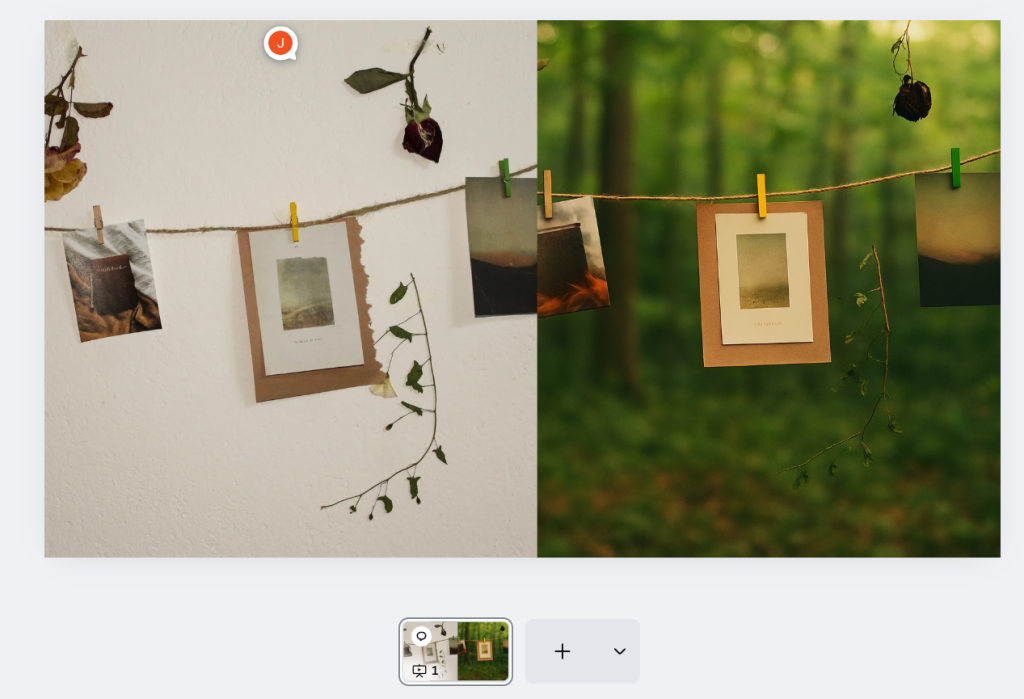
How I’d Use It: The “Bedroom Studio” Strategy
If I were selling a product online but didn’t have a budget for a studio, I wouldn’t hire a professional photographer. I would use Adobe Photoshop (Generative Fill) or Canva.
Here is my specific workflow:
- The “Messy” Shot: I would simply take a photo of my product on my kitchen table with my iPhone. No lighting setup, just natural daylight.
- AI Background Swap: Instead of just removing the background, I would use AI to “Generate a marble countertop with soft morning shadows.”
- The Realistic Touch: To sell the illusion, I’d ask AI to add a specific prop, like “a steaming cup of coffee next to the product,” which blends the lighting perfectly.
Bottom line: This turns an amateur phone photo into a high-end brand asset in 3 minutes, saving thousands of dollars on physical photoshoots.
Limitations and Considerations for AI Image Editing
Despite their capabilities, AI image editing tools come with important limitations to consider:
- Potential for unnatural results: AI-generated edits can sometimes produce unnatural or ‘hallucinated’ artifacts, requiring manual correction. This is particularly evident in complex scenes or with unusual lighting conditions.
- Ethical implications and data privacy: Users should be aware of how their images are processed, where they’re stored, and whether they’re used to train AI models.
- Dependency on connectivity: Many cloud-based tools require stable internet connections, which can limit usability in certain environments.
- Skill required for fine-tuning: While AI makes initial edits easier, achieving perfect results often still requires human judgment and manual adjustments.
My Take: The limitations of current AI image editing tools highlight that they remain assistive technologies rather than complete replacements for human creativity and judgment. The “uncanny valley” effect is still present in many AI-generated edits, particularly when pushing the technology beyond straightforward tasks. Users should approach these tools with realistic expectations and be prepared to apply finishing touches manually for professional-quality results.
Future Trends in AI Image Editing
The AI image editing landscape continues to evolve rapidly, with several emerging trends:
- Advancements in generative AI: Future tools will offer increasingly sophisticated generation capabilities, allowing for more complex scene creation and manipulation based on natural language prompts.
- Improved semantic understanding: Recent trends show a significant focus on improving semantic understanding for more accurate and context-aware edits, enabling AI to better comprehend image content and user intent.
- Real-time editing and collaboration: Emerging technologies will enable multiple users to collaborate on AI-enhanced edits simultaneously, with changes appearing in real-time across devices.
My Take: The trajectory of AI image editing points toward increasingly intelligent systems that require less specific direction from users. The gap between professional and amateur results will likely continue to narrow as AI becomes more adept at understanding context and applying appropriate enhancements. Market indicators suggest that voice and natural language interfaces will become more prevalent, further reducing technical barriers to sophisticated image manipulation.
Choosing the Right AI Image Editor for Your Needs
Selecting the appropriate AI image editing tool requires careful consideration of several factors:
- Specific requirements: Assess whether you need comprehensive editing capabilities or specialized functions like background removal or batch processing.
- Scalability and integration: Consider how the tool will fit into your existing workflows and whether it can grow with your needs.
- User interface and support: Evaluate the learning curve and available resources for mastering the tool, especially if you’ll be training team members.
My Take: The ideal AI image editing solution varies significantly based on user needs and technical comfort. Organizations should conduct small-scale trials before full adoption, as the practical workflow benefits often outweigh feature comparisons on paper. User adoption rates tend to be highest with tools that offer immediate value through automation of existing tasks, rather than those requiring significant workflow changes despite promising greater capabilities.
Conclusion: The Evolving Landscape of AI in Visual Creation
AI has fundamentally transformed image editing, making sophisticated visual creation accessible to users of all skill levels while simultaneously expanding the creative possibilities for professionals. The technology continues to advance rapidly, with each iteration bringing improvements in quality, usability, and capabilities.
As AI image editing tools mature, we can expect continued innovation in how we create, modify, and enhance visual content. The barrier between imagination and realization will continue to lower, empowering more people to express their creativity visually without technical limitations.
Pricing Plans
Below is the current pricing overview for the tools mentioned above:
- Canva: $12.99/mo, Free Plan Available
- Adobe Photoshop: $19.99/mo
- Fotor: $3.99/mo, Free Plan Available
- Luminar Neo: Contact Sales / Custom Pricing
- remove.bg: $9/mo, Free Plan Available
- Picsart: $13/mo, Free Plan Available
Value for Money
When evaluating AI image editing tools for value, it’s important to consider both capabilities and alignment with specific needs. Fotor stands out as an exceptionally cost-effective option for users seeking basic AI enhancement features without requiring advanced capabilities. Its accessible price point makes it an excellent entry point for small businesses and content creators working with limited budgets.
For professional users, Adobe Photoshop’s higher price point is offset by its comprehensive feature set, industry-standard compatibility, and continuous AI improvements through Adobe Sensei. Meanwhile, specialized tools like remove.bg deliver outstanding value for users with specific, frequent needs like background removal, often justifying their cost through time savings alone. The availability of free plans across most platforms provides an excellent opportunity to test capabilities before committing to paid subscriptions.
Editor’s Summary
AI image editing tools have transformed visual content creation, making professional-quality results accessible to users of all skill levels. For beginners and small businesses, platforms like Canva and Fotor offer the best balance of capabilities and accessibility. Professional users benefit most from Adobe Photoshop’s comprehensive toolset and workflow integration, while specialized tools like remove.bg excel at specific tasks. The technology continues to advance rapidly, with improvements in generative capabilities and semantic understanding driving the next wave of innovation. While AI tools dramatically reduce technical barriers and accelerate workflows, they still benefit from human oversight to ensure natural-looking results, particularly for complex edits.