⚡ Quick Verdict
✅ Best For: Content creators and marketers needing unique visuals without extensive design skills
⛔ Skip If: You require absolute legal certainty for unique IP ownership
💡 Bottom Line: Midjourney offers the best balance of quality and control for most users, but alternatives like DALL-E 3 or Adobe Firefly may better suit specific workflows.
Why AI Image Generation is a Game-Changer Right Now
The demand for visual content continues to increase across digital platforms, with AI image generators bridging the gap between concept and creation. These tools create diverse visuals from natural language text prompts, allowing users to select various artistic styles ranging from photorealistic to abstract.
- Users can generate unique visuals without traditional design skills
- Iterative prompt refinement helps achieve desired results
- Control over aspect ratios and output resolution is standard
- Many tools include advanced image manipulation features
⛔ Dealbreaker: Skip AI image generators if you need guaranteed copyright certainty for commercial projects with strict legal requirements.
Insight: Right now, the biggest advantage of AI image generation isn’t just speed, it’s how quickly you can explore multiple visual directions before committing to a final concept—something that used to require a designer and several revision rounds.
What Text-to-Image AI Actually Solves for You
AI image generators directly address the gap between creative vision and technical execution. They enable rapid visualization of concepts, helping overcome creative blocks while producing professional-quality visuals without extensive design expertise.
- Generates unique marketing materials and social media content efficiently
- Aids in creating concept art or character designs for storytelling
- Accelerates content creation cycles across various media
- Facilitates personal artistic expression for hobbyists
Limitation: Generated images can still struggle with perfect anatomical accuracy, occasionally containing nonsensical elements.
Insight: Think of text-to-image AI as a fast sketch artist, not a flawless technical illustrator—it’s ideal for getting ideas on the page quickly, then refining or retouching only the best concepts.
Who Should Seriously Consider Using an AI Image Generator
AI image generators provide particular value to specific user groups facing visual content challenges. The technology serves as both a creative accelerator and accessibility tool for those without traditional design resources.
- Graphic designers seeking inspiration and accelerated iteration cycles
- Marketers and content creators requiring unique visual assets at scale
- Small business owners needing professional visuals without a design team
- Artists exploring new styles or seeking rapid prototyping capabilities
⛔ Dealbreaker: Skip this if you’re unwilling to invest time in prompt engineering techniques, as quality outputs often require skilled prompt crafting.
Insight: The people who benefit most are those already producing content regularly—AI becomes a force multiplier when you’re creating campaigns, posts, or concepts every week, not just once in a while.
Who Should NOT Rely Solely on AI Image Generators
Despite their capabilities, AI image generators aren’t suitable for every situation or user. Understanding these limitations helps prevent misaligned expectations and potential workflow disruptions.
- Organizations requiring absolute legal certainty for unique IP ownership
- Projects demanding highly specific artistic vision without iteration
- Users unwilling to learn prompt engineering fundamentals
- Teams needing consistent brand identity across all visuals
⛔ Dealbreaker: Skip AI generators if you need consistent output quality, as results can vary significantly across different models and prompt variations.
Insight: If your visuals must match an existing brand style pixel-for-pixel, AI should support your design process, not replace a human-led brand system or style guide.
Midjourney vs. DALL-E 3 vs. Adobe Firefly: When Each Option Makes Sense
Each major AI image generator has distinct strengths and limitations that make it more suitable for specific use cases and user preferences.
| Feature | Midjourney | DALL-E 3 | Adobe Firefly | Stable Diffusion |
|---|---|---|---|---|
| Artistic Quality | High | Moderate | High with safe data | Customizable |
| Workflow Integration | Discord-based | Simple prompt interface | Extensive with Creative Cloud | Flexible, technical setup |
| Prompt Interpretation | Creative and broad | Literal and precise | Commercially safe focus | Dependent on customization |
| Usage Ease | Requires some learning | Intuitive for users | Seamless for Adobe users | Technical knowledge needed |
Midjourney excels at artistic quality but relies on a Discord-based interface, while DALL-E 3 offers strong prompt interpretation with fewer stylistic options. Adobe Firefly integrates seamlessly with Creative Cloud and emphasizes commercially safe training data. For teams with strict workflow, security, or compliance requirements, a Discord-only access model can be a practical limitation.
💡 Rapid Verdict:
Best suited for teams prioritizing speed and creative flexibility over strict IP control. But SKIP THIS if you need guaranteed copyright certainty.
⛔ Dealbreaker: Skip Midjourney if you need direct API access for custom application development without Discord interaction.
Insight: In practice, many teams pair tools: Midjourney for high-impact hero images, DALL-E 3 for more literal or instructional visuals, and Firefly when legal and brand safety are top priorities.
Key Risks and Limitations to Be Aware Of
AI image generators come with important considerations that affect their practical application. Understanding these limitations helps set realistic expectations and develop appropriate workflows.
- Achieving precise outputs requires skilled prompt engineering
- Ethical concerns persist regarding AI training data and potential biases
- Copyright and ownership remain complex legal issues
- Output quality varies significantly across models and prompts
⛔ Dealbreaker: Skip AI image generators if your work requires complete control over every visual element, as these tools occasionally produce unexpected or unintended results.
Insight: The safest approach is to treat AI outputs as draft assets—plan on manual review, light retouching, and legal checks for anything mission-critical or widely distributed.
Final Decision Guidance: Choosing Your Ideal AI Image Generator
Selecting the right AI image generator depends on aligning tool capabilities with your specific needs. Consider your primary use cases, technical comfort, and quality requirements when making your decision.
- Choose Midjourney for artistic quality and stylistic range
- Select DALL-E 3 for accurate prompt interpretation
- Pick Adobe Firefly for commercial safety and Creative Cloud integration
- Consider Stable Diffusion for customization and local deployment options
⛔ Dealbreaker: Skip complex AI image generators if you need immediate results without a learning curve, as mastering these tools takes time and experimentation.
Insight: A simple decision rule is: choose based on your biggest constraint—creative quality (Midjourney), clarity and control (DALL-E 3), legal comfort and integration (Firefly), or customization and self-hosting (Stable Diffusion).
How I’d Use It
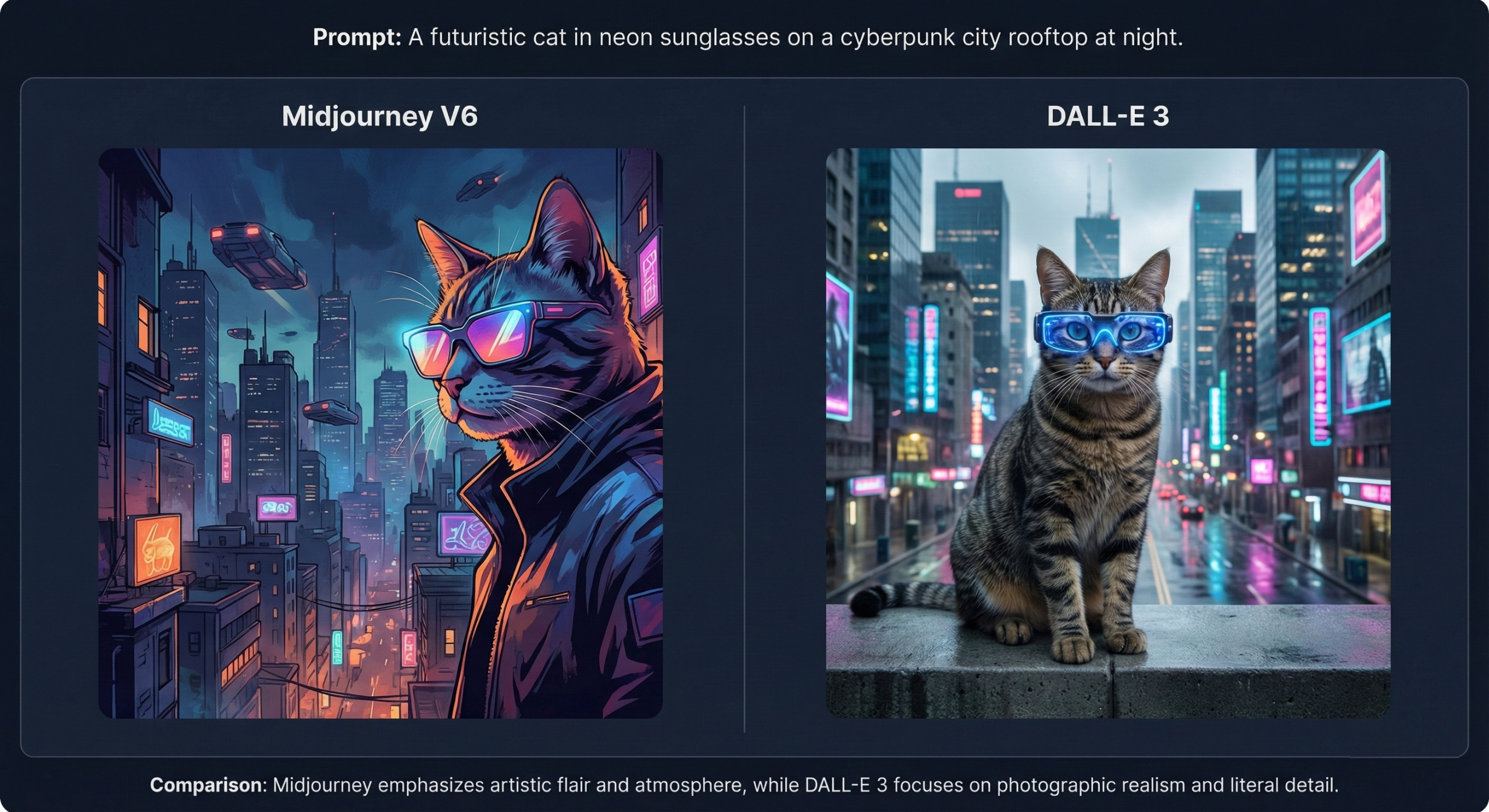
I’d start by identifying my primary visual content needs—in my case, creating custom illustrations for blog posts and social media. For this specific purpose, I’d choose Midjourney as my main tool, with DALL-E 3 as a backup for situations where I need more literal prompt interpretation.
My workflow would be straightforward: First, I’d draft a clear concept description, focusing on subject, style, and mood. Then I’d generate 4-6 variations in Midjourney, select the most promising direction, and refine with follow-up prompts. For final touches, I’d sometimes export to Photoshop for minor adjustments like text overlay or cropping.
I’ve noticed that including specific artistic references in prompts (like “in the style of Monet” or “cyberpunk aesthetic”) tends to produce more consistent results than vague descriptors. When working with Midjourney specifically, I’d keep my prompt library organized by project type to build on successful formulations rather than starting from scratch each time.
While no AI tool perfectly captures every creative vision, this approach would give me a practical balance between creative control and production efficiency for most content marketing needs.
Pricing Plans
Below is the current pricing overview:
- Midjourney: Starting at $10/month, no free plan available
- DALL-E 3: Included in ChatGPT Plus ($20/month)
- Adobe Firefly: Starting at $9.99/month, (Free 25 credits/mo)
- Stable Diffusion: Free plan available
- Leonardo.AI: Free plan available
- Canva AI: Starting at $12~15/month, free plan available
Pricing may vary depending on usage limits and platform integration.
Value for Money
For small businesses and individual creators, Midjourney’s $10/month basic plan offers strong value considering the quality of outputs and frequent model updates. The lack of a free tier is offset by the consistent quality and active community support that helps users improve their results.
Adobe Firefly presents compelling value for existing Creative Cloud subscribers, as its commercial-safe training approach reduces potential legal concerns. For enterprise users, the integration with existing Adobe workflows may justify the higher overall cost compared to standalone alternatives.
Free options like Stable Diffusion provide good entry points for experimentation, but often require more technical knowledge or accept quality trade-offs. The value equation ultimately depends on your output requirements, usage volume, and how much time you’re willing to invest in learning prompt engineering techniques.
Final Verdict
- ✅ Buy this if:
You need to create unique, high-quality visuals regularly without design skills or want to accelerate your creative workflow. - ⛔ Skip this if:
You require absolute legal certainty for commercial IP ownership or can’t invest time in learning prompt engineering. - 👀 Best Alternative:
If you need stronger commercial safety assurances, choose Adobe Firefly.
If you’re new to AI image generation, start with one tool and spend a week refining prompts before switching.