
AI Video Generators for Product Demos: Best Tools Compared in 2025
To save readers extensive research time, this article compiles verified data from official sources and trusted review platforms as of November 22, 2025.
Overview of AI Video Generators for Product Demos
AI video generators have transformed how businesses create and distribute product demos, making it possible to produce high-quality content with significantly less time, cost, and technical effort. These tools enable teams to showcase product functionality clearly and consistently without relying on traditional video production workflows.
The Role of AI in Modern Product Demonstrations
Product demos play a critical role in influencing purchase decisions. AI-driven video tools remove common production barriers while improving scalability and consistency.
No technical expertise required: Create professional demos without filming or editing skills
Faster production cycles: Reduce creation time from weeks to hours
Cost efficiency: Eliminate expenses for equipment and production crews
Consistent branding: Maintain visual and messaging alignment across all demos
Key Features to Look for in AI Product Demo Generators
When evaluating AI-powered tools for product demos, several features are essential:
Customization options: Align visuals and messaging with brand identity
AI avatars and voiceovers: Present demos without hiring on-camera talent
Screen recording capabilities: Capture product workflows and interactions
Interactive elements: Increase engagement through clickable components
Template libraries: Accelerate video creation with reusable layouts
Export and sharing options: Distribute demos across multiple platforms
Best AI Video Generators for Product Demos
The following four platforms offer strong capabilities for creating effective product demo content.
Comparison Grid: AI Video Generators for Product Demos (2025)
| Tool | Best Use Case | Core Strengths | Limitations | Starting Price |
|---|---|---|---|---|
| Synthesia | Presenter-led enterprise demos | AI avatars, multilingual support, screen recording integration | Custom pricing, less interactive than click-through demos | Custom (sales inquiry) |
| Supademo | Interactive product walkthroughs | Clickable demos, analytics, no-code setup | Limited for traditional video storytelling | Free plan available |
| Pictory | Content-to-demo video repurposing | Automated editing, stock media, voiceovers | Less control over detailed product flows | $23/month |
| Vimeo | All-in-one hosting and demo creation | Hosting, collaboration, marketing integrations | Advanced AI features depend on plan level | $20/month |
Synthesia
Synthesia is a leading AI video creation platform known for presenter-led product demos.
No technical setup required: Create videos without cameras or editing tools (source: synthesia.io)
AI avatars: Choose from over 140 digital presenters
Multilingual support: Translate demos into more than 120 languages
Screen recording integration: Combine product footage with AI presenters
How I’d Execute It: The “Global Micro-Demo” Workflow
Stop spending weeks filming generic product tours. I use Synthesia to mass-produce personalized, localized demos without ever touching a camera.
Here is my exact “Script-to-Screen” routine:
1. Record “Clean” Screen Footage Don’t use the AI editor to record. Use a dedicated tool (like OBS or CleanShot X) to capture your product workflow silently.
- Rule: Keep mouse movements slow and smooth. No narration yet.
2. Import and Add the “Pip” Avatar Upload your footage to Synthesia. Select a professional avatar and place it in a circular “Picture-in-Picture” frame in the bottom corner. This builds trust without blocking the UI.
3. Script the “Why,” Not the “How” Type your script into the editor.
- Bad Script: “Now I am clicking the settings button.” (The viewer can see that.)
- Good Script: “Use this setting to reduce team errors by 50%.” (Add context.)
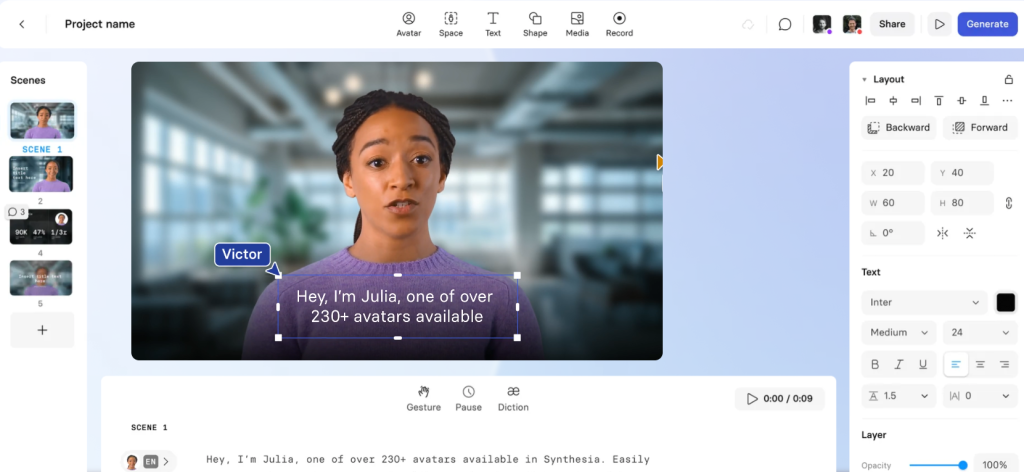
4. The “One-Click” Localization This is the killer move. Once the English version is done, duplicate the video and select “Translate -> Spanish/French/German.” The AI regenerates the lip-sync and voice instantly. You now have global assets from one session.
Supademo
Supademo focuses on building interactive, click-through product experiences.
Interactive demos: Create clickable product tours (source: supademo.com)
No-code platform: Design demos without programming
Analytics dashboard: Track engagement and usage metrics
Embedding options: Integrate demos into websites and email campaigns
Pictory
Pictory specializes in converting existing content into product-focused videos.
Content repurposing: Turn long-form content into short demo videos (source: pictory.ai)
- Automated editing: AI identifies key moments for efficient cuts
Stock media library: Access thousands of royalty-free assets
Voiceover generation: Automatically create narration
Vimeo AI Video Maker
Vimeo extends its established video platform with AI-powered creation tools.
Versatile creation tools: Support product demos and other video formats (source: vimeo.com)
Enterprise-grade hosting: Reliable delivery and analytics
Collaboration features: Simplify team review and approval workflows
Marketing integrations: Connect with CRM and automation platforms
Pricing and Subscription Models
Understanding pricing structures helps organizations choose platforms aligned with production needs.
Synthesia Pricing
Custom pricing available upon request
Sales contact required for tailored quotes (source: synthesia.io)
Best suited for enterprise-scale teams
Supademo Pricing
Free plan available for basic usage
Paid plans unlock advanced features
Custom enterprise pricing via sales inquiry (source: supademo.com)
Pictory Pricing
Standard plan: $23 per month
Multiple tiers for different usage levels
Transparent pricing with no hidden fees (source: pictory.ai)
Vimeo Pricing
Starter plan: $20 per month
Feature-based pricing structure
Scalable options for growing production demands (source: vimeo.com)
Practical Insight: Why Product Demo Effectiveness Depends on Format, Not Just Video Quality
Many teams evaluate AI video generators based on visual quality alone. In practice, the effectiveness of a product demo depends more on its format than on production polish.
Presenter-led videos work well for storytelling and enterprise positioning, while interactive demos often perform better for self-serve products where users want to explore features at their own pace. Content-based video tools are most effective when repurposing existing assets rather than explaining complex workflows from scratch.
Choosing the right AI demo tool therefore requires matching the demo format to the buyer’s decision stage. Teams that align format, audience intent, and distribution channel tend to see higher engagement and conversion rates than those relying on a single demo style.
Use Cases and Benefits
AI video generators support a wide range of product demo scenarios.
Improving Customer Engagement with AI-Driven Demos
AI-generated demos enhance understanding and interaction through personalization and dynamic content.
Personalized experiences: Tailor demos for different audience segments
Interactive elements: Encourage active exploration
Consistent messaging: Deliver uniform, high-quality communication
Multilingual capabilities: Reach global audiences efficiently
Streamlining the Product Demo Creation Process
These platforms significantly improve workflow efficiency and speed.
Rapid iteration: Update videos quickly as products evolve
Resource optimization: Reduce reliance on production teams
Template-based creation: Maintain brand alignment
Automated processes: Eliminate repetitive tasks
Conclusion: Choosing the Right AI Video Generator for Your Needs
The best AI video generator depends on your demo objectives, budget, and workflow requirements.
Synthesia is ideal for polished, presenter-led demos
Supademo excels at interactive product tours
Pictory is effective for repurposing existing assets at $23 per month
Vimeo offers a strong all-in-one solution starting at $20 per month
Select the platform that best aligns with your production needs and marketing goals.

Editor’s Summary
AI video generators have become a practical standard for product demonstrations in 2025, not because they replace traditional video production entirely, but because they remove the friction that once limited speed and scale. For many teams, the ability to update, localize, and distribute demos quickly now matters more than cinematic production quality.
This comparison highlights that no single platform fits every demo scenario. Presenter-led videos, interactive walkthroughs, and content-driven demos each serve different stages of the buyer journey. Tools such as Synthesia, Supademo, Pictory, and Vimeo reflect these differences in both feature focus and pricing models.
The most effective product demo strategies treat AI video tools as format enablers rather than one-size-fits-all solutions. Teams that align demo format with audience intent and product complexity are better positioned to improve engagement, clarity, and conversion outcomes over time.