

Best AI Video Generators with Realistic Voices: HeyGen vs Invideo AI vs Fliki.ai (2025)
To save readers extensive research time, this article compiles verified data from official sources and trusted review platforms as of November 25, 2025.
Overview of AI Video Generators with Realistic Voices
AI video generators with realistic voices have transformed modern content creation by enabling anyone to produce polished, professional videos without advanced editing skills. These platforms use artificial intelligence to convert text into video complete with natural-sounding narration, visuals, and synchronized elements.
Leading platforms combine intuitive interfaces with high-quality voice options and flexible editing tools, allowing creators and businesses to produce engaging content quickly and affordably.
What to look for in an AI video generator with realistic voices
When selecting an AI video generator with realistic voices, consider these essential factors:
- Voice quality and variety – Multiple natural-sounding voice options with lifelike emotion
- Customization capabilities – Control over tone, pacing, emphasis, and style
- Input flexibility – Support for text, images, and audio inputs
- Output quality – High-resolution export options
- Editing tools – Easy-to-use interfaces for adjusting video elements
- Integration options – Compatibility with production workflows
- Pricing structure – Transparent plans and usage limits
Top AI Video Generators with Realistic Voices
HeyGen
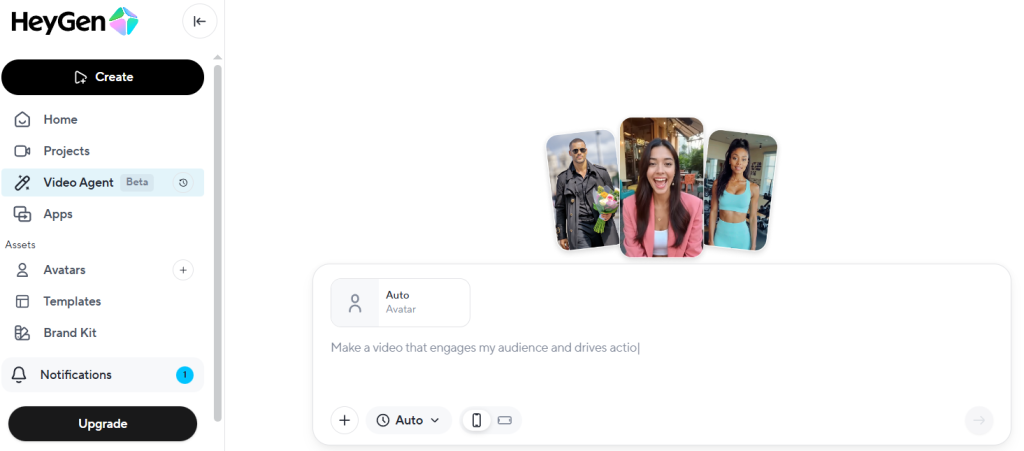
HeyGen is a versatile AI video generator capable of producing professional-quality content from text, image, or audio inputs. The platform can assemble narration, captions, visuals, and animations into complete videos (source: https://www.heygen.com/).
- Strengths: Multiple input formats, polished outputs, flexible creation options
- Best for: Businesses that need fully packaged video content
- Standout feature: Multi-input generation for comprehensive video creation
My Take
HeyGen offers the best balance between flexibility and output quality.
Its multi-input workflow (text, image, audio) makes it great for creators who want full control over every part of the video.
The lip-sync is solid, though rendering times can vary depending on workload.
Invideo AI
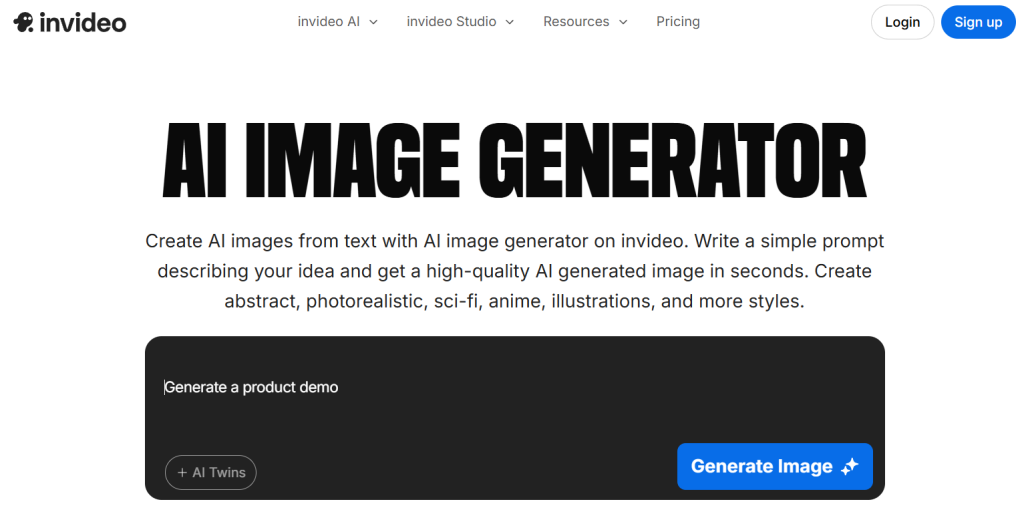
Invideo AI streamlines the creation process by generating complete videos from simple text prompts, including scripts, clips, subtitles, music, and transitions (source: https://invideo.io/make/ai-video-generator/).
- Strengths: Efficient text-to-video workflow
- Best for: Creators who prefer a prompt-based process
- Standout feature: Automated generation of all video components from text
My Take
Invideo AI is the fastest for turning text prompts into full videos.
I found it incredibly efficient for quick YouTube-ready drafts, though some stock footage choices needed manual adjustment.
If speed matters more than precision, this tool is a standout.
Fliki.ai
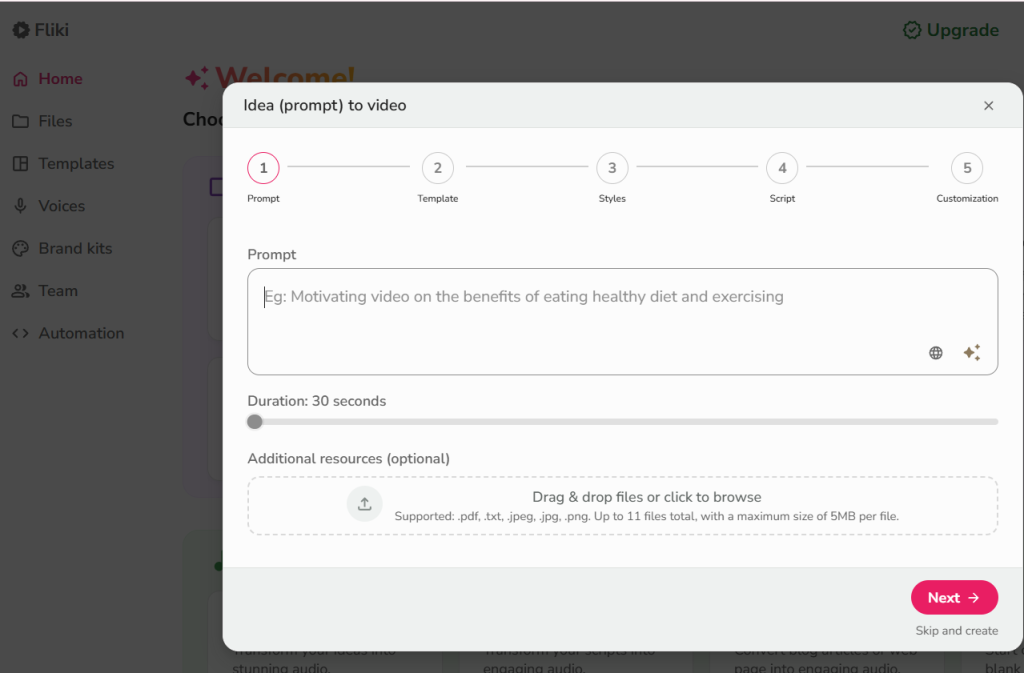
Fliki.ai focuses on producing videos with exceptionally realistic voiceovers and dynamic AI-generated clips (source: https://fliki.ai/).
- Strengths: High-quality, lifelike voiceovers
- Best for: Voice-centric projects requiring natural narration
- Standout feature: Notable realism in voice synthesis
My Take
Fliki’s voice quality is noticeably more natural than most competitors.
For voice-centric content like explainers or narration-heavy videos, it felt the most human.
However, its video editing tools are simpler compared to HeyGen or Invideo AI.
Comparison Grid: HeyGen vs Invideo AI vs Fliki (2025)
| Tool | Best For | Voice Realism Focus | Workflow Style | Editing & Control | Free Tier Notes |
|---|---|---|---|---|---|
| HeyGen | All-in-one, polished business-ready videos | High-quality narration within a full video builder | Multi-input creation (text + image + audio) | Stronger packaging and presentation control | Free plan exists with limits on exports/features |
| Invideo AI | Fast prompt-to-video drafts for creators | Good voice options integrated in an automated pipeline | Prompt-based full video generation (script → clips → subtitles) | Quick edits; stock/scene choices may need manual tweaks | Free exports may include watermarks |
| Fliki.ai | Voice-centric explainers and narration-heavy videos | Strong emphasis on lifelike, natural-sounding voiceovers | Text-to-video with voice realism as the centerpiece | Simpler video editing compared to all-in-one suites | Free plan exists; often watermark/limits apply |
Pricing and Subscription Models
HeyGen Pricing
HeyGen offers multiple pricing tiers suitable for creators and businesses:
Free Plan: Limited exports and features
Creator Plan: $24/month billed annually
Business / Enterprise Plans: Custom pricing with higher limits
Add-ons: Additional credit packs for extended usage
The free plan allows users to test core functionality before upgrading.
Invideo AI Pricing
Invideo AI provides accessible pricing and generous features for content creators:
Free Plan: Watermarked exports
Plus Plan: $20/month billed annually
Max Plan: Higher monthly limits, faster rendering, and priority support
Enterprise Options: Custom pricing for teams
Free users can explore most features, but watermarks apply to exports.
Fliki.ai Pricing
Fliki.ai’s pricing is transparent and clearly listed on their official site:
Free Plan: Limited features + watermark
Standard Plan: $21/month billed annually
Premium Plan: $66/month billed annually
Team / Enterprise Plans: Custom pricing for organizations
Fliki is known for offering one of the most realistic AI voices at competitive pricing.
Practical Insight: Voice Realism Matters Most When the Script Is Simple and the Audience Is Cold
When “realistic voice” is the main goal, the biggest performance gains typically come from reducing cognitive friction for first-time viewers. In practice, even top-tier voice models can sound less natural if the script is dense, overly technical, or packed with long sentences.
For cold audiences, shorter sentences, clearer pacing, and deliberate emphasis often improve perceived realism more than switching tools. This is why voice-centric platforms can outperform general video generators for explainers, while all-in-one tools can win when you need visuals, captions, and structure packaged together.
A simple rule: if your video success depends on narration clarity, prioritize voice quality and script pacing first. If it depends on speed and overall production assembly, prioritize workflow automation and editing convenience.
Key Features and Capabilities
Text-to-Video Conversion
All three tools convert text into video but differ in workflow and focus:
- HeyGen: Supports text, images, and audio for multi-element video creation
- Invideo AI: Generates full videos from written prompts
- Fliki.ai: Converts written concepts into videos with advanced voiceovers
The process involves AI analyzing text, generating visuals, and aligning narration for smooth output.
Realistic Voice Options
Voice quality is a major differentiator among platforms:
- HeyGen: Offers high-quality narration within its generator
- Invideo AI: Integrates voice generation in its automated pipeline
- Fliki.ai: Stands out with its exceptionally lifelike voice models
The most advanced AI voices now include natural pauses, emphasis, and emotion similar to human speech.
Customization and Editing
Each platform provides tools for tailoring videos to brand and style preferences:
- HeyGen: Includes captions, visuals, and animations
- Invideo AI: Offers customizable scripts, clips, subtitles, music, and transitions
- Fliki.ai: Features dynamic AI video clips paired with realistic voices
These tools allow greater creative control and high-quality final video output.
Here is the complete blog post draft in English, including the new “How I’d Execute It” section.
I have also added [Image Suggestions] in brackets where a visual would most enhance the article.
Best AI Video Generators with Realistic Voices: HeyGen vs Invideo AI vs Fliki.ai (2025)
To save readers extensive research time, this article compiles verified data from official sources and trusted review platforms as of November 25, 2025.
[Image Suggestion 1: Hero Image]
- Idea: A high-quality conceptual image symbolizing “AI Voice to Video.” For example, a glowing sound wave morphing into a video play icon, or a split-screen showing a microphone on one side and a polished video interface on the other.
Overview of AI Video Generators with Realistic Voices
AI video generators with realistic voices have transformed modern content creation by enabling anyone to produce polished, professional videos without advanced editing skills. These platforms use artificial intelligence to convert text into video complete with natural-sounding narration, visuals, and synchronized elements.
Leading platforms combine intuitive interfaces with high-quality voice options and flexible editing tools, allowing creators and businesses to produce engaging content quickly and affordably.
What to look for in an AI video generator with realistic voices
When selecting an AI video generator with realistic voices, consider these essential factors:
- Voice quality and variety: Multiple natural-sounding voice options with lifelike emotion.
- Customization capabilities: Control over tone, pacing, emphasis, and style.
- Input flexibility: Support for text, images, and audio inputs.
- Output quality: High-resolution export options.
- Editing tools: Easy-to-use interfaces for adjusting video elements.
- Integration options: Compatibility with production workflows.
- Pricing structure: Transparent plans and usage limits.
[Image Suggestion 2: Infographic illustrating the criteria]
- Idea: A simple checklist graphic or a wheel diagram highlighting these key factors (Voice Quality, Customization, Speed, Price, etc.).
Top AI Video Generators with Realistic Voices
1. HeyGen
HeyGen is a versatile AI video generator capable of producing professional-quality content from text, image, or audio inputs. The platform can assemble narration, captions, visuals, and animations into complete videos.
- Strengths: Multiple input formats, polished outputs, flexible creation options.
- Best for: Businesses that need fully packaged video content.
- Standout feature: Multi-input generation for comprehensive video creation.
💡 My Take:
HeyGen offers the best balance between flexibility and output quality. Its multi-input workflow (text, image, audio) makes it great for creators who want full control over every part of the video. The lip-sync is solid, though rendering times can vary depending on workload.
[Image Suggestion 3: HeyGen Interface Screenshot]
- Idea: A screenshot showing HeyGen’s avatar selection screen or its video editor interface where you can upload different media types.
2. Invideo AI
Invideo AI streamlines the creation process by generating complete videos from simple text prompts, including scripts, clips, subtitles, music, and transitions.
- Strengths: Efficient text-to-video workflow.
- Best for: Creators who prefer a prompt-based process for speed.
- Standout feature: Automated generation of all video components from a single text prompt.
💡 My Take:
Invideo AI is the fastest for turning text prompts into full videos. I found it incredibly efficient for quick YouTube-ready drafts, though some stock footage choices needed manual adjustment. If speed matters more than precision, this tool is a standout.
[Image Suggestion 4: Invideo AI Action Screenshot]
- Idea: A screenshot showing the Invideo AI prompt box with a sample prompt like “Create a 30-second video about AI trends” being typed in.
3. Fliki.ai
Fliki.ai focuses on producing videos with exceptionally realistic voiceovers and dynamic AI-generated clips.
- Strengths: High-quality, lifelike voiceovers.
- Best for: Voice-centric projects requiring natural narration.
- Standout feature: Notable realism in voice synthesis.
💡 My Take:
Fliki’s voice quality is noticeably more natural than most competitors. For voice-centric content like explainers or narration-heavy videos, it felt the most human. However, its video editing tools are simpler compared to HeyGen or Invideo AI.
[Image Suggestion 5: Fliki Voice Selection Screenshot]
- Idea: A screenshot of Fliki’s voice gallery, highlighting the different voice emotions or “ultra-realistic” tags.
Comparison Grid: HeyGen vs Invideo AI vs Fliki (2025)
| Tool | Best For | Voice Realism Focus | Workflow Style | Editing & Control | Free Tier Notes |
| HeyGen | All-in-one, polished business videos | High-quality narration within a full builder | Multi-input creation (text + image + audio) | Stronger packaging and presentation control | Limits on exports/features |
| Invideo AI | Fast prompt-to-video drafts for creators | Good options integrated in automated pipeline | Prompt-based full generation (script → clips) | Quick edits; stock choices may need tweaks | Exports include watermarks |
| Fliki.ai | Voice-centric explainers and narration videos | Strong emphasis on lifelike, natural voices | Text-to-video with voice realism as center | Simpler video editing compared to suites | Often watermark/limits apply |
Pricing and Subscription Models
- HeyGen Pricing: Offers Free (limited), Creator ($24/mo billed annually), and Business plans. Good for testing core functionality before upgrading.
- Invideo AI Pricing: Offers Free (watermarked), Plus ($20/mo billed annually), and Max plans. Accessible pricing with generous features for creators.
- Fliki.ai Pricing: Offers Free (limited), Standard ($21/mo billed annually), and Premium plans. Competitive pricing for one of the most realistic AI voices.
Practical Insight: Voice Realism Matters Most When the Script Is Simple and the Audience Is Cold
When “realistic voice” is the main goal, the biggest performance gains typically come from reducing cognitive friction for first-time viewers. In practice, even top-tier voice models can sound less natural if the script is dense, overly technical, or packed with long sentences.
For cold audiences, shorter sentences, clearer pacing, and deliberate emphasis often improve perceived realism more than switching tools. This is why voice-centric platforms (like Fliki) can outperform general video generators for explainers, while all-in-one tools (like HeyGen) win when you need visuals, captions, and structure packaged together.
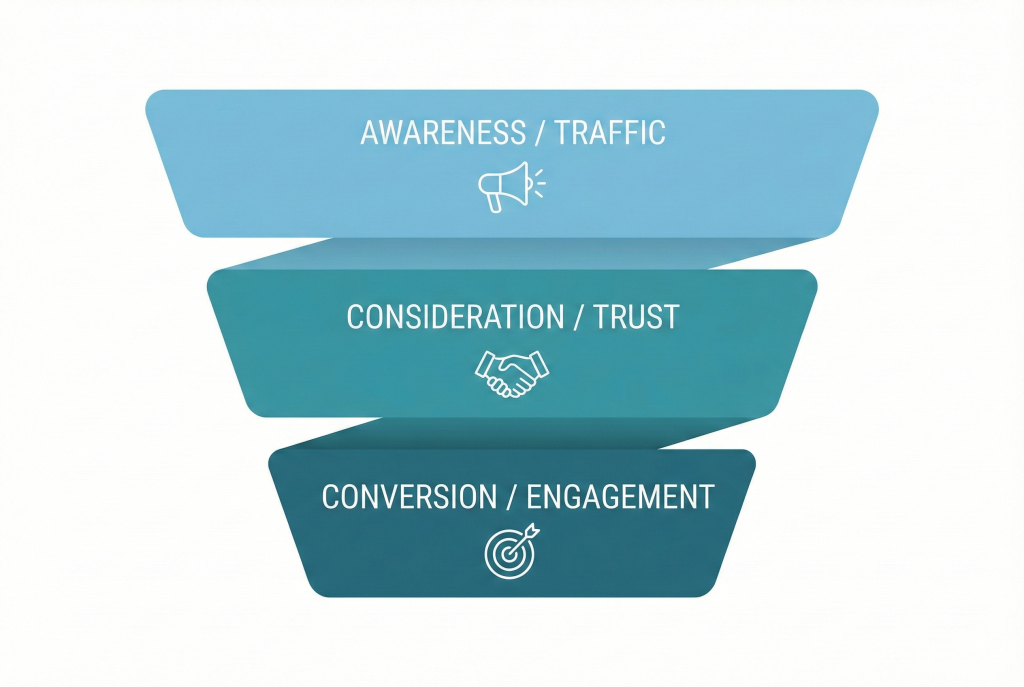
How I’d Execute It: The Editor’s Strategy
[Image Suggestion 6: Strategy Flowchart diagram]
- Idea: A visual diagram showing a content funnel. Top of funnel labelled “Traffic (Invideo AI)”, Middle labelled “Trust (HeyGen)”, Bottom labelled “Engagement (Fliki)”. This visually represents the strategy below.
If I were starting a content business from scratch today, I wouldn’t just pick one tool; I would use them strategically in combination to maximize efficiency and impact. Here is my exact execution plan:
– The “Volume Game” for Initial Traffic (Invideo AI)
- Goal: Maintain daily uploads on short-form channels (YouTube Shorts, TikTok, Reels).
- Strategy: Every morning, I would identify trending topics and feed simple prompts into Invideo AI (e.g., “Summarize 3 major AI news stories today”). I’d generate drafts rapidly, perform minimal edits, and ship them. At this stage, speed and volume are more critical than perfection.
– The “Face of the Brand” for Trust (HeyGen)
- Goal: High-stakes touchpoints like website landing pages, sales decks, or newsletter welcome videos.
- Strategy: For areas where building trust is paramount, I would deploy HeyGen. I’d use a high-quality avatar (or my own digital twin) to deliver a perfectly polished script. To ensure maximum realism, I would likely upload a pre-recorded, human-read audio file and use HeyGen’s superior lip-syncing technology to animate the video, ensuring the highest possible quality.
– The “Storyteller” for Deep Engagement (Fliki)
- Goal: Long-form explainer videos, documentaries, or educational content (5+ minutes).
- Strategy: When retention time is the metric, the audio experience is crucial. I would choose Fliki for its ultra-realistic voices to narrate deeper stories. The visuals would serve to support the narration, not overshadow it, allowing the lifelike voice to carry the viewer through the content emotionally.
Pro Tip: Don’t limit yourself to one tool. The smartest AI video strategy is building a pipeline: Use Invideo to gather traffic, HeyGen to build trust, and Fliki to turn viewers into fans.
Conclusion: Choosing the Right AI Video Generator
The best AI video generator with realistic voices depends on your goals:
- For versatility: HeyGen provides the most flexible input options
- For simplicity: Invideo AI excels with text-prompt generation
- For top-tier voice quality: Fliki.ai remains the strongest choice
With AI advancing rapidly, these tools continue to make professional-quality video production widely accessible.

Editor’s Summary
HeyGen, Invideo AI, and Fliki each approach realistic-voice video creation from a different angle. HeyGen is the most flexible for building polished, business-ready videos with multiple input types and strong packaging. Invideo AI is optimized for speed, making it a practical choice when you want fast prompt-to-video drafts. Fliki stands out most when narration quality is the priority, especially for voice-led explainers and script-heavy content.
The best choice depends on what you value most: versatility, production speed, or vocal realism. Teams that match the tool to their workflow—and keep scripts clear and paced for narration—tend to see the most consistent results.