
It broke anyway.Not because the logic was wrong. Not because the API failed. Because when one module in a 17-step chain misfires, you don’t get a clean error. You get a cascade — and then you spend the next 40 minutes hunting through modules trying to figure out which one actually caused it.
This is the overengineering trap in Make.com. And it’s more common than the community admits.
Decision Snapshot

The Module Count Is Not a Flex
There’s a pattern that shows up in almost every Make.com build that grows past a certain point. It starts reasonable: trigger, filter, transform, send. Then someone adds a router. Then a subflow. Then an aggregator. Then three more conditional paths because “what if the data looks like this instead.”
Before long, the scenario canvas looks like a circuit board. And it feels productive. It looks thorough.
But complexity is not coverage. It’s liability.
The community has documented this clearly: going from 14 modules to 50 doesn’t make a workflow more powerful — it makes it nearly impossible to debug. When one step breaks, you’re not fixing a module. You’re searching through a tangled web of conditional paths to find which node triggered the failure, and whether that failure cascaded silently into something else downstream.
The first version of a workflow almost always has this problem. It looks complete. It still fails.
What Collapse Actually Looks Like
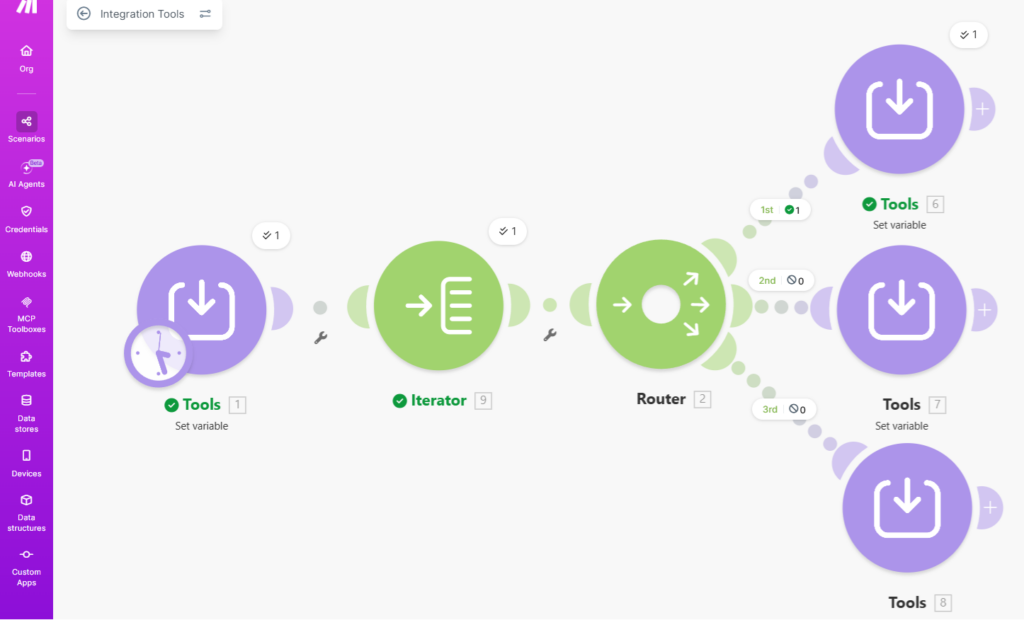
At a glance, the workflow looks correct.
Three branches.
Clear structure.
Nothing obviously broken.
But this is exactly why debugging takes time.
The failure isn’t visible in the structure.
It lives in how the conditions interact.
Here’s the scenario that surfaces this pattern most clearly:
A workflow handles lead intake. It pulls form data, filters incomplete records, enriches with a third-party lookup, routes by geography, updates a CRM, sends a Slack notification, and logs to a Google Sheet — all in one scenario. Works fine in testing with five records. Deploy it with real volume and something breaks mid-run.
The error message references module 11. Module 11 depends on output from module 7. Module 7 only fails when module 4 returns a null field. And module 4 only returns null when the form submission uses a specific input pattern you didn’t test for.
You don’t have a module 11 problem. You have a module 4 assumption problem. But you spent 40 minutes finding that out.
That’s the collapse scenario.
Not a dramatic outage.
A slow, invisible diagnostic tax that compounds every time the workflow touches an edge case.
This matches what happens when Make.com scenarios hit rate limits at scale — fine during testing with small data sets, broken in production with real volume.
The architecture that looked clean at 5 records becomes a liability at 500.
The Profit Angle
The real cost of an overbuilt workflow isn’t the failed execution — it’s the 30–40 minutes of manual debugging that happens every time it breaks. Multiply that across a team, across a month, and you’re not running an automation operation. You’re running a maintenance operation with automation aesthetics.
Before / After: One Scenario vs. Three
Before — single monolithic scenario:
Trigger → filter → enrich → route → update CRM → notify Slack → log to Sheet
When this breaks, every module is a suspect. Debugging requires tracing the full chain. One bad data record can halt or corrupt the entire run. Error isolation takes significant time even for someone familiar with the build.
After — split into three focused workflows:
- Workflow 1: Intake and enrichment only — trigger, filter, enrich, pass clean data to a webhook
- Workflow 2: Routing and CRM update — receives clean data, applies routing logic, updates CRM
- Workflow 3: Notifications and logging — Slack alert, Sheet log, nothing else
When Workflow 3 breaks, you fix Workflow 3. It doesn’t touch the intake logic. It doesn’t touch the CRM update. The error surface is contained. The fix is fast.
This is the direct outcome of the pattern: the first workflow had 17 modules — debugging took 40 minutes. Split into three workflows, the same type of failure became a targeted fix instead of a full audit. The architecture didn’t get simpler. The failure surface got smaller.
The 30-Second Workflow Debt Audit
- The 15-Node Rule: If your scenario has 15+ modules and a single error takes more than 5 minutes to isolate, you don’t have an automation—you have a maintenance liability.
- Cascading Failure: Why a 17-step chain is 10x more fragile than three 6-step modules. Every node you add increases the failure surface exponentially.
- The Invisible Tax: Calculate the labor cost of your team “babysitting” a complex scenario every time it hits an edge case. That is your true automation cost.
- Deterministic vs. Hope-Based: Stop adding “what-if” filters. Move to modular, webhook-based architectures that fail in isolation, not in a heap.
The Wrong Assumption That Makes This Worse
The assumption most builders carry into this is: one workflow means one place to look when something goes wrong.
It doesn’t. One workflow means one place for everything to go wrong simultaneously.
Splitting workflows feels counterintuitive. More scenarios seems like more complexity. But complexity in Make.com is not measured by scenario count — it’s measured by how many modules share the same failure surface. Three clean workflows with five modules each are radically easier to maintain than one scenario with 17 modules and three routers.
The technical fix is straightforward: use webhooks to pass structured data between independent scenarios. Workflow 1 ends with an HTTP module sending a JSON payload. Workflow 2 starts with a webhook trigger receiving it. Each workflow is isolated. Each workflow has its own error handler. Each workflow fails independently.
One structured JSON payload between scenarios is cleaner than a 17-node chain where every module inherits the risk of every module before it.
Workflow Complexity vs. Maintenance Cost
What This Does NOT Solve
Splitting workflows is not a universal fix. It introduces its own problems.
Webhook latency. If you’re passing data between workflows via webhooks, you’re adding a network hop. For time-sensitive processes, this matters.
Data traceability. A monolithic workflow has one execution log. Split workflows have three. If a record goes wrong across the chain, you’re checking three separate histories to reconstruct what happened.
Overhead for simple builds. If your workflow genuinely has five modules and one clean path, splitting it is unnecessary complexity. This pattern is for scenarios that have grown past the point where a single person can hold the full logic in their head.
Make.com doesn’t natively merge parallel routes. If you split into parallel workflows and need to converge the outputs, you’ll need a workaround — there’s no native converger module. This is a real architectural constraint, not a minor inconvenience.
The split approach earns its cost when the workflow is large enough that debugging the whole thing costs more than the overhead of managing three separate scenarios.
The Real Question Is When to Split
Not every Make.com scenario needs to be broken apart. The signal isn’t module count alone — it’s debugging friction.
If you can’t immediately identify which module caused a failure without reading through the full execution log, the workflow has outgrown its architecture. If adding a new feature to the workflow requires touching modules that have nothing to do with that feature, it’s time to split.
The practical threshold: once a single scenario handles more than two distinct business functions — intake and enrichment and routing and notification — it’s already a candidate for decomposition. Each distinct function is a natural split point.
The irony is that the workflows that most need splitting are the ones that feel most complete. They’ve been added to over time, incrementally. Each addition made sense. The whole stopped making sense three additions ago.
Get the Workflow Breakdown
The next issue covers how to map split points before you build — not after. Join the list and get the setup notes when it drops.
Alex’s Take
A workflow that takes 40 minutes to debug isn’t an automation. It’s a liability wearing an automation costume. Split it before it teaches you that lesson the hard way.